A few months ago I was trying to research something genuinely specific — regulatory changes affecting a particular industry a client works in. I typed the question into Google. What I got back was a Reddit thread from 2023, two SEO-stuffed listicles that mentioned the keyword but didn’t actually answer anything, and a paywalled article from a trade publication I couldn’t access. Forty minutes later I had parts of an answer, stitched together from five different browser tabs. A colleague sitting next to me watched this whole process, shook his head, and said “just use Perplexity.” I’d heard the name. I hadn’t bothered. Ten minutes after switching over, I had a sourced, synthesized, clearly written answer with numbered citations linking directly to the primary sources.
That was the moment I stopped treating Perplexity as a novelty and started actually using it for work. So this review is based on several months of real use — not a demo, not a press release, but actual daily research tasks run through both Perplexity and Google so I could compare them honestly.
What Perplexity Actually Is (and Why It’s Different)
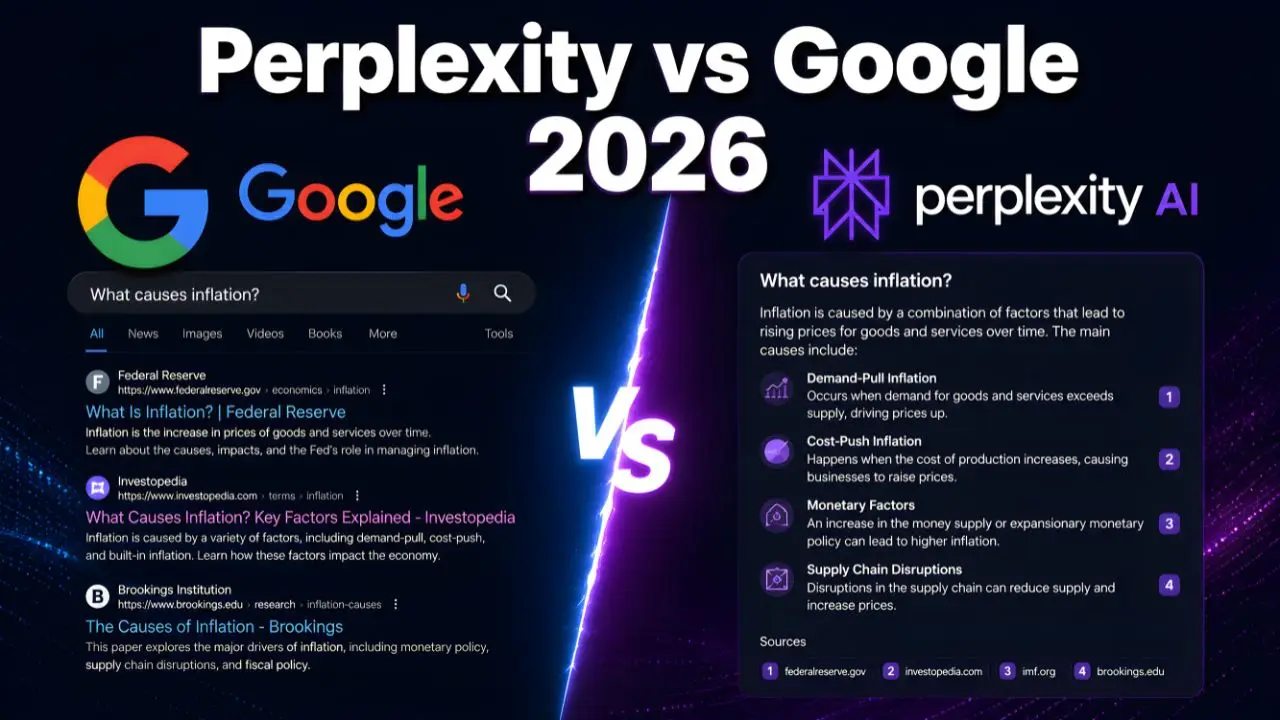
Perplexity isn’t a chatbot and it isn’t a traditional search engine. It’s an answer engine — it takes your question, searches the live web in real time, reads multiple sources, synthesizes the information into a clear answer, and shows you exactly which source every claim came from. Every sentence comes with a numbered citation you can click to verify. That last part is what makes it genuinely different from ChatGPT or Claude, both of which can answer questions but often without telling you where the information came from or whether it’s current.
It launched in 2022, grew steadily through 2024 and 2025, and by 2026 has become one of the most-discussed alternatives to Google among researchers, students, journalists, and professionals who do heavy information work. The free tier is genuinely usable. The Pro plan runs $20/month (or $200/year, which works out to about $16.67/month — a 17% discount if you’re committing to it).
The Test I Actually Did
I ran the same eight research questions through both Google and Perplexity over two weeks, logging how long each took and how many clicks or follow-up searches I needed to get a complete answer. The questions ranged from simple factual lookups (“what is the current UK Corporation Tax rate?”) to complex multi-part questions (“what are the main differences between ISO 27001 and SOC 2 compliance, and which is more appropriate for a SaaS company selling to US enterprise customers?”).
For the simple factual questions, Google and Perplexity were roughly equal. Google was occasionally faster on pure lookup queries because of its featured snippets. For the complex, multi-source questions — the ones that actually take time and effort to research — Perplexity was dramatically faster. The ISO 27001 vs SOC 2 question took me about 22 minutes on Google across six browser tabs. On Perplexity, I had a complete, cited answer in under two minutes, with a follow-up question answered in 30 seconds. That kind of time difference compounds significantly if research is a meaningful part of your day.
The Features That Actually Matter
Citations on Everything — and Why That Matters More Than You’d Think
Every single answer Perplexity gives you includes numbered citations you can click immediately. If it says a company’s revenue grew 34% last year, there’s a [1] next to that number linking to the source that reported it. This sounds like a small thing until you’ve been burned by an AI tool confidently making something up with no way to verify it — then it feels enormous. Honestly, the citation system alone is reason enough to try Perplexity if you do any kind of research where accuracy matters.
That said — and this is important — citations aren’t a guarantee of accuracy. Perplexity occasionally misattributes claims: the cited source exists, but doesn’t actually say what Perplexity claims it says. It’s less common than hallucinations in uncited AI tools, but it happens. Always click through and verify anything high-stakes before you use it in something professional.
Focus Modes: This Is the Feature Most People Skip
When you type a query into Perplexity, you can choose where it searches. The Focus modes include Web (default, searches the open internet), Academic (restricts results to peer-reviewed journals and scholarly databases via Semantic Scholar), Reddit (pulls from real user discussions — surprisingly useful for “what do actual users think of X?”), YouTube (finds and summarizes relevant video content), and Wolfram Alpha (for quantitative or mathematical queries). Switching to Academic mode and asking about a medical topic or scientific finding is a completely different experience from asking the general web — you get actual research literature instead of a mix of blogs and health websites.
In my experience, the Reddit focus mode is genuinely underrated for product research. Ask “what do real users think of [software tool]?” in Reddit focus mode and you get synthesized community sentiment from actual users rather than review sites that may have been gamed. That’s useful in a way Google’s search results rarely are anymore.
Deep Research: The Feature That Justifies the Pro Plan
Perplexity’s Deep Research is a long-form agentic research mode that’s available to Pro subscribers. Instead of returning a quick answer, it runs for 2–6 minutes doing a multi-step investigation — decomposing your question into sub-questions, searching across multiple sources for each, and then synthesizing everything into a multi-page report with full citations. Think of it as getting a research brief written for you rather than just an answer to a question.
I tested it with a genuinely complex prompt: “Research the current competitive landscape for AI-powered customer support tools, including the top 10 vendors, their pricing models, key differentiators, and what enterprise buyers say about implementation challenges.” The output was a structured, four-section report that would have taken me a meaningful chunk of an afternoon to assemble manually. Was it perfect? No — I found two claims where the cited source didn’t quite support what was written. But as a starting framework I could verify and build from? Genuinely impressive for $20/month.
Spaces: For Ongoing Research Projects
Spaces are collaborative research environments within Perplexity — think of them as project folders for research. You can create a Space for a specific project, set custom standing instructions like “always cite peer-reviewed sources” or “focus on UK market data,” upload your own documents, and invite collaborators to research within the same environment. The AI remembers context across sessions inside a Space, so you’re not starting from scratch every time you return to an ongoing project.
This is a Pro feature, and it’s the one I’d point to for anyone who works on extended research projects — market analysis, academic research, competitive intelligence. Keep Spaces focused on specific topics though — a Space with 30 unrelated documents dilutes the context for any specific query. One project, one Space.
Model Council: A Genuinely Clever Idea
Model Council lets you ask multiple frontier AI models the same question and compare their answers side by side. So you can run the same research query through Perplexity’s own Sonar model, GPT-4o, and Claude at the same time and see where they agree, where they diverge, and which sources each one cites. For a Pro subscriber at $20/month, that multi-model access bundled with web search is genuinely good value — no other platform packages this cleanly at that price point.
Where Perplexity Beats Google (and Where It Doesn’t)
Let me be specific here, because the answer isn’t “Perplexity wins, use it for everything.” That’s not accurate and it’d be doing you a disservice.
Perplexity is clearly better for: Complex research questions where you need synthesis across multiple sources. Current events where you want a structured answer rather than a feed of links. Academic or technical questions where source quality matters. Competitive research and market analysis. Any situation where you’d normally spend 20+ minutes opening tabs and reading — and just want the answer.
Google is still better for: Local search. Maps. Shopping and price comparisons. Image search. Video discovery. Finding a specific website you already know exists. Exploring a topic broadly when you want to browse rather than get a synthesized answer. And honestly — anything where you want to see the actual landscape of sources rather than a pre-synthesized view of them.
Perplexity doesn’t do product comparisons, price tracking, or local business discovery the way Google does. If you’re looking for a restaurant near you, or trying to track down the best current price for a specific product across retailers, Google wins that comparison easily. Perplexity knows what it is, and it doesn’t pretend to be a general-purpose search engine.
Have you ever noticed that when you Google something research-related, you spend the first five minutes just evaluating whether each result is worth clicking? That’s the friction Perplexity removes — it does that evaluation and reading for you, then hands you the synthesis. That’s a fundamentally different value proposition, and it’s a real one.
Perplexity vs ChatGPT vs Claude: The Quick Version
These three tools get compared constantly (and usually imprecisely). Here’s how I’d actually describe the difference based on real use:
Perplexity is for research. Real-time web search, citations, source verification, Deep Research reports. Use it when accuracy and currency matter and you need to know where information came from.
ChatGPT is for generation and reasoning. Writing drafts, brainstorming, coding help, long-form creative work, complex reasoning chains. Less reliable for current information, but stronger at producing original output.
Claude is for long-document analysis and nuanced writing. Uploading a lengthy PDF and asking questions about it, editing and refining existing text, tasks that require careful reading and careful writing.
I’d push back on anyone who says you should pick one and stick with it exclusively. Most serious users of AI tools end up running Perplexity alongside ChatGPT or Claude, each doing what it does well. That’s exactly how I use them — Perplexity for research and fact-finding, Claude or ChatGPT for writing and synthesis. They’re not competing for the same job.
The Free Tier vs Pro: What You Actually Get
The free tier of Perplexity is more genuinely useful than most freemium AI products. Standard searches — using Perplexity’s faster, lighter model — are unlimited on the free plan. You also get a limited number of Pro searches per day (around 5), which use deeper reasoning and access to stronger models. For casual use, that’s enough. Most people who use Perplexity occasionally for research questions won’t hit the free tier ceiling.
Pro at $20/month (or $16.67/month billed annually at $200/year) unlocks unlimited Pro searches, Deep Research mode, file uploads so you can ask questions about your own documents, full Spaces functionality, and the Model Council feature. The annual Pro billing at $200/year works out to about $16.67/month — a solid 17% discount versus monthly billing.
Who should pay for Pro? If research is a meaningful part of your work — you’re a writer, journalist, analyst, consultant, student doing serious academic work, or just someone who spends real time every week digging through information — the time savings from Deep Research alone will justify $20/month within the first week. If you use Perplexity casually a few times a week for general questions, the free tier is genuinely sufficient. Don’t upgrade just because the features sound interesting — upgrade when you feel the free tier actually constraining you.
The Honest Weaknesses
Perplexity isn’t flawless. It occasionally cites sources that don’t fully support the claim being made (check those citations before you use them professionally). It’s weaker than ChatGPT and Claude for creative writing, brainstorming, and code generation — it’s a research tool, not a general assistant. Even Pro users are limited to 20 Deep Research queries per day, which is enough for most workflows but can feel tight during intense research sessions. And the mobile app experience is noticeably behind the desktop version — if you use it primarily on your phone, some of the more advanced features are fiddly to access.
The thing nobody tells you about AI search tools in general is that the quality of what you get out is almost entirely determined by the specificity of what you put in. “Tell me about AI in healthcare” gets you something generic. “What are the FDA-approved AI diagnostic tools in radiology as of 2026, and what do hospitals report about implementation barriers?” gets you something genuinely useful. Perplexity rewards precise, detailed prompts more than any other tool I’ve tested — it’s not a weakness exactly, more a skill that takes a few sessions to develop.
Who Should Use Perplexity Right Now
Start using it immediately if you’re: a student doing research papers, a journalist or blogger who fact-checks regularly, a consultant or analyst who spends time on competitive research, a small business owner trying to understand markets or regulations, or anyone whose job involves synthesizing information from multiple sources on a regular basis.
You can probably stick with Google if you’re: primarily doing local searches, shopping comparisons, or casual browsing. Using it to find specific websites you already know about. Or if most of your searches are simple one-answer lookups where Google’s featured snippets already give you what you need — you get the idea.
Links to get started:
- Perplexity AI — Free tier, no account required for basic searches
- Perplexity Pro — $20/month or $200/year
Try the free version for two weeks before deciding on Pro. Run your actual work questions through it. If you keep hitting the Pro search limit and finding yourself switching back to Google for complex questions, that’s your signal to upgrade. If the free tier handles everything you throw at it, stay there.
So here’s what I genuinely want to know: what kind of research tasks take up the most of your time right now — the type where you’re opening six tabs and still not finding a clean answer? Drop it in the comments. I want to know whether Perplexity would actually help with your specific workflow, and I’ll give you an honest answer based on what I’ve tested.